When the lights go out, whether it's a grid-wide emergency, a severe storm, or simply the desire for off-grid adventure, having a reliable power source isn't just a convenience—it's a necessity. That's where knowing How to Use & Set Up 4Patriots Solar Generators becomes indispensable. These powerful, portable units are designed to keep your essential devices running, your food cold, and your family safe, even when conventional power sources fail. Forget the noisy, fume-spewing gas generators of old; 4Patriots solar generators offer a clean, quiet, and efficient alternative for preparedness and outdoor living.
This comprehensive guide will walk you through everything from unboxing to advanced troubleshooting, ensuring you can confidently deploy your 4Patriots generator when it matters most.
At a Glance: Your 4Patriots Solar Generator Essentials
- Ready Out of the Box: Arrives pre-charged and requires no assembly.
- Clean & Quiet Power: Silent, fume-free, and safe for indoor use.
- Versatile Charging: Recharge via AC wall outlet, solar panel, or even alternative DC sources.
- Simple Operation: Intuitive LCD display and easy-to-use ports.
- Emergency Ready: Designed for power outages, storms, and off-grid adventures.
- Maintenance: Top off charge every six months for optimal readiness.
- Key Models: Popular options like the Patriot Power Generator 1800 and the 2500X (our primary focus).
Why a 4Patriots Solar Generator is Your Emergency Lifeline
In today's unpredictable world, relying solely on an often-fragile electrical grid can leave you vulnerable. A 4Patriots solar generator offers a robust solution for a variety of scenarios. Unlike traditional gas generators, which demand fuel storage, emit noxious fumes, and create significant noise pollution, a 4Patriots unit like the 2500X operates silently and produces no dangerous emissions, making it perfectly safe for indoor use. This is a game-changer during long power outages when you need to power medical devices, keep a refrigerator running, or simply light your home without ventilation concerns.
Think of it as your personal, portable power grid, ready to step in when the unexpected happens. Whether you're facing a natural disaster, a widespread blackout, or planning a remote camping trip, a 4Patriots solar generator provides peace of mind and the practical ability to sustain your modern life.
Unboxing Your Preparedness Kit: What's in the Box & First Steps
The moment your 4Patriots solar generator arrives, you're already halfway to preparedness. These units are specifically designed for immediate deployment, meaning they arrive charged and require absolutely no assembly. It’s truly a plug-and-play experience, built with emergencies in mind.
For the Patriot Power Generator 2500X, your package will typically contain:
- The Patriot Power Generator 2500X unit itself.
- An AC wall-outlet charging cord for fast, convenient recharging.
- A user manual—your most important accessory.
Crucial First Step: Read the User Manual
We know, "read the manual" isn't the most exciting advice, but with a piece of equipment as vital as a solar generator, it's non-negotiable. The user manual contains specific details for your model, including safety warnings, operational nuances, and troubleshooting tips tailored to your device. Taking the time to familiarize yourself with it now can prevent costly mistakes and ensure optimal performance when you need it most.
Safety First: Essential Warnings and Cautions
Before you even think about plugging anything in, understand these critical safety guidelines. Your well-being and the longevity of your generator depend on it:
- Avoid Dangerous Environments: Never use your 4Patriots solar generator in rain, snow, or any damp conditions. Electrical components and moisture don't mix, posing a shock hazard. Similarly, keep it far away from explosive atmospheres, such as areas with gaseous fumes, excessive dust, or flammable materials, as electrical sparks could trigger an explosion.
- Inspect Cords: Always check your AC and DC charging cords for any signs of damage or fraying before use. Compromised cords can lead to electrical hazards. Replace them immediately if they show wear.
- Medical Device Compatibility: This is paramount. If you intend to power life-support systems or other critical medical devices, you must consult with the device manufacturer first. Confirming compatibility ensures the generator provides the stable, consistent power your medical equipment requires.
By adhering to these precautions, you ensure a safe and effective experience with your 4Patriots solar generator.
Powering Up: How to Charge Your 4Patriots Generator
One of the great strengths of a 4Patriots solar generator is its versatility in charging. You're not tied to a single power source, offering flexibility whether you're at home, in an emergency, or out in the wild.
The Power Trio: Charging Methods at a Glance
Your 4Patriots generator offers multiple ways to replenish its battery:
- AC Wall Outlet: The fastest and most convenient method when grid power is available.
- Solar Panel: Free, clean, and sustainable power from the sun, ideal for emergencies and off-grid scenarios.
- Alternative DC Sources: Options like hand-cranks, bicycle generators, or wind turbines for truly independent charging.
Fast & Reliable: AC Wall Outlet Charging
This is your go-to method for quickly topping off your generator's charge before an emergency or after extended use.
Steps for AC Charging:
- Locate the AC charging input port on your generator (for the 2500X, this is the 120V AC Charging Input).
- Plug one end of the included AC wall-outlet charging cord into the generator's AC input port.
- Plug the other end of the cord into a standard AC wall outlet.
- The unit will begin charging immediately. You'll typically see a charging indicator or a lightning symbol on the LCD display, and the screen will show the increasing charge percentage.
- The unit is designed to stop charging automatically once it reaches 100% to prevent overcharging.
Harnessing the Sun: Step-by-Step Solar Charging
Solar charging is the most empowering feature of a 4Patriots generator, offering true energy independence. The units, including the 2500X, utilize MPPT (Maximum Power Point Tracking) technology, which optimizes the power harvest from your solar panels, even in less-than-ideal conditions.
Steps for Solar Charging:
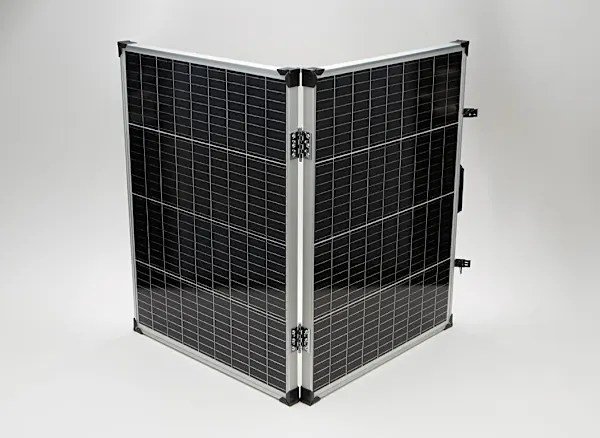
- Deploy Your Panel: Open the included solar panel(s) and place them outdoors in direct sunlight. Ensure they are angled towards the sun for maximum exposure. Avoid shade from trees, buildings, or other obstructions.
- Connect the Solar Panel: Locate the DC input ports on the back of your generator (the 12V-30V DC & Solar Port Charging Input on the 2500X). Using the solar connector cord, connect your solar panel(s) to these inputs.
- Check Polarity: This is crucial for efficient and safe charging. Ensure correct polarity: connect the black connector from the solar panel to the black input on the generator, and the red connector to the red input. Incorrect polarity can hinder charging or potentially damage the unit.
- Charge Away: Leave the unit connected to the solar panel(s) for as long as the sun is up. The generator does not need to be powered on to charge. It will continuously draw power from the sun, and the LCD display will show the charging progress.
- Automatic Cutoff: Once the generator is fully charged, the unit's internal system will automatically stop the current flow. You'll know it's full when the lightning symbol on the display disappears, and the screen clearly shows "100% full."
Pro Tips for Optimal Solar Charging:
- Shade the Generator: While solar panels need direct sun, your generator itself will charge more efficiently if it stays cool. When solar charging outside, use the solar panel itself or a separate cover to shade the main generator unit from direct sunlight.
- Daylight Only: Solar panels generate power from sunlight. They will not charge your battery at night. Leaving them connected without sufficient sunlight won't damage the unit, but it won't add power either. In fact, if poorly connected without a solar controller (which your 4Patriots unit has built-in), some battery depletion could occur, but the integrated cutoff largely prevents this.
Beyond the Grid: Alternative DC Charging
For extreme off-grid situations or if solar isn't an option, some 4Patriots generators support alternative DC charging sources.
Steps for Alternative DC Charging:
- Identify your alternative DC charging source (e.g., hand-crank generator, bicycle generator, small wind turbine).
- Plug the DC port extension cable into the appropriate DC input on your generator.
- Connect the other end of the DC port extension cable to the output of your alternative charging source.
- Engage your charging source (e.g., crank the handle, pedal the bicycle). The generator will begin to charge.
This flexibility ensures you have options for keeping your power flowing, no matter the circumstances.
Operating Your Generator: A User's Guide to the 4Patriots 2500X
The Patriot Power Generator 2500X is designed for straightforward operation, even under stressful conditions. Its intuitive interface puts power at your fingertips.
Turning On and Navigating the Display
To begin using your generator:
- Power On: Locate the master power button on the front of the unit. Press and hold it down for a few seconds (long press).
- LCD Illumination: The LCD display will illuminate, showing your current battery level, input/output wattage, and other vital statistics. This display provides a real-time overview of your generator's status.
- Screen Toggle Button: Use the screen toggle button to cycle through different display modes or information screens if available.
- Checkmark Button: This button is typically used to confirm selections or navigate menu options within the LCD interface, though for basic operation, you'll mainly be monitoring the display.
Understanding the Interface: Ports and Buttons
Familiarize yourself with the key components of your 2500X's interface:
- Master Power Button: The main on/off switch for the entire unit.
- LCD Home Screen Display: Your central hub for all operational information.
- Screen Toggle Button: For navigating display modes.
- Checkmark Button: For confirming settings.
- 12V-30V DC & Solar Port Charging Input: Where you connect solar panels and other DC charging sources.
- 120V AC Charging Input: Where you connect the AC wall-outlet charging cord.
- USB & USB-C Power Button & LED Indicator: Activates the USB ports for charging smaller devices. The LED indicates when these ports are active.
- AC Power Button & LED Indicator (to the left of LCD): This dedicated button activates the AC outlets. A lit blue LED confirms the AC outlets are ready to provide power.
- DC Cigarette Outlet: For specific 12-volt devices.
Powering Your Devices (AC, USB, DC Cigarette Outlet)
Connecting your devices is simple once the generator is powered on:
- AC Devices: To use the standard household outlets, first ensure the generator's master power button is on. Then, locate the AC power button (typically to the left of the LCD display) and press it. A blue LED light will illuminate, indicating the AC outlets are active. Plug in your 110V-120V devices, keeping in mind the 2500X has two outlets that share a combined total current limit of 2500W. It also features a slow-start feature to protect sensitive electronics.
- USB Devices: For charging phones, tablets, and other USB-powered gadgets, locate the USB & USB-C Power Button and press it. The corresponding LED indicator will light up. Plug your USB cables into the available USB and USB-C ports.
- DC Cigarette Outlet Devices: If you have a 12-volt device that uses a car-style cigarette lighter plug (like some car refrigerators or air compressors), plug it into the DC cigarette outlet. Ensure your device is rated for a maximum of 10 amps to avoid overloading the port.
By understanding these basic operations, you can effectively manage and distribute power from your 4Patriots solar generator to your essential electronics.
Beyond the Emergency: Pre-Event Checklist & Smart Storage
A solar generator is only useful if it's ready when you need it. A little proactive planning goes a long way in ensuring your 4Patriots unit performs flawlessly during an actual emergency.
Testing Your Setup: Practice Makes Perfect
Don't wait for a crisis to discover your setup has a hitch. Regular testing builds confidence and identifies potential issues beforehand.
- Simulated Outage: Periodically disconnect your generator from its charging source and power a few essential items, like a lamp, your phone, or a small radio. See how long it runs them.
- Solar Charging Drill: Practice setting up your solar panels, connecting them to the generator, and monitoring the charging process. This familiarizes you with the procedure and helps you identify optimal placement for your panels.
- Understand Load: Get a feel for what appliances draw the most power and how long your generator can sustain them. This will help you prioritize during a real emergency.
Strategic Storage: Keeping it Safe and Accessible
Where and how you store your 4Patriots solar generator directly impacts its readiness and longevity.
- Easy Access: Store the generator in a location that is easily accessible, even in darkness. You don't want to be fumbling through clutter when the power suddenly goes out.
- Off the Floor: To protect against potential flooding or water damage, always store your generator off the floor. A sturdy shelf or elevated platform is ideal.
- Manual & Accessories Handy: Keep the user manual, solar panel(s), and all charging cords stored with the generator. You don't want to be searching for them in an emergency.
- Temperature Considerations: While the 2500X operates in a wide range of temperatures (Charging: 32-120°F / 0-45°C; Discharging: 0-120°F / -17-49°C), storing it in extremely hot or cold conditions for extended periods can affect battery life. A cool, dry place is generally best for long-term storage.
Maintenance for Peak Performance: The 6-Month Top-Off
Unlike gas generators that require fuel stabilization and engine maintenance, solar generators are relatively low maintenance. However, one crucial task ensures it's always ready:
- Top Off the Charge: Every 6 months, even if you haven't used it, plug in your 4Patriots generator and top off its charge to 100%. Batteries naturally lose a small percentage of charge over time, and keeping them fully charged extends their lifespan and ensures maximum capacity when you need it most.
By following these simple practices, your 4Patriots solar generator will be a reliable ally for years to come.
Understanding Your Investment: Lifespan, Warranty & Expansion
When you invest in a 4Patriots solar generator, you're not just buying a piece of equipment; you're securing a long-term solution for power independence. Understanding its capabilities and support ensures you get the most out of your purchase.
Built to Last: The Impressive Lifespan of 4Patriots Generators
One of the standout features of 4Patriots generators is their exceptional durability and cycle life. For example, the Patriot Power Generator 1800 is engineered to withstand over 2,500 full drain-and-recharge cycles. To put that in perspective, this equates to approximately 6.8 years of daily use, which is roughly four times the typical shelf life of many competitor generator products. This robust design suggests that the 2500X also offers a similarly impressive lifespan, providing reliable power for well over half a decade of consistent use. This longevity makes your 4Patriots generator a truly worthwhile investment for sustained preparedness.
Peace of Mind: The 4Patriots Guarantee & Warranty Details
4Patriots stands behind its products with strong guarantees and warranties, offering peace of mind to its customers.
- 100% Money-Back Satisfaction Guarantee: The Patriot Power Generator 1800, for instance, comes with a full-year, 100% money-back satisfaction guarantee. This demonstrates the company's confidence in its product.
- 2500X Warranty: For the Patriot Power Generator 2500X, the warranty period is 0 to 365 days from the original purchase date. This warranty specifically covers defects in materials or workmanship. It also covers non-cosmetic normal wear and tear-related damages, which is a significant benefit.
- Important Warranty Notes:
- Authorization Required: If you need to return your unit under warranty, authorization from 4Patriots is required. Always contact their support team first.
- Voids Warranty: Any damage caused willfully or through negligence will void the warranty. This underscores the importance of following all operational and safety guidelines outlined in the user manual and in this guide.
For specific warranty claims or questions, always refer to your user manual and contact 4Patriots directly.
Need More Power? Expanding Your System
Sometimes, even a powerful unit like the 2500X isn't enough for extended outages or powering a larger array of appliances. 4Patriots offers solutions to expand your power storage.
- Patriot Power Expandable Battery 1300: For increasing your overall power capacity, consider integrating the Patriot Power Expandable Battery 1300. This external battery seamlessly connects to your main generator unit.
- Optimizing Expanded Systems: When using an expandable battery, it's generally best to ensure both the main generator unit and the Power Bloc (expandable battery) are fully charged or at roughly the same state of charge (SOC) before connecting them. The system will split the load between the main unit's battery and the Power Bloc, operating most efficiently when their charge levels are synchronized.
By understanding these aspects, you can make informed decisions about your 4 Patriots solar generator and ensure it meets your evolving power needs.
Troubleshooting Common Questions & Issues
Even with the best preparation, questions and minor issues can arise. Here are solutions to some common troubleshooting scenarios for your 4Patriots 2500X.
"My Unit Won't Turn On!"
This is a common concern, but usually has a simple fix:
- Check Master Power: First, ensure the main master power button on the front of the unit has been long-pressed and is definitely "on."
- Activate AC Power: Remember that for the AC outlets to work, there's a separate AC power button (typically to the left of the LCD display) that needs to be pressed ON. A blue LED light should illuminate to confirm it's active. Both the master power and the AC power buttons need to be engaged to output AC power.
"What's That Smell?"
A burning odor can be alarming, but context is key:
- Normal vs. Concerning: Your 4Patriots generator should not have a strong or chemical burning odor.
- Dust & Debris: A very light, faint odor, sometimes compared to that of a clothes dryer, might occasionally be noticed. This is typically due to dust, dirt, or debris accumulating inside the unit's cooling fans or vents, which then gets slightly heated and expelled. This is usually not a cause for concern unless the odor is strong, persistent, or accompanied by smoke or other warning signs. If you detect a strong or unusual smell, immediately power down the unit and contact 4Patriots support.
Technical Specifications at a Glance: Patriot Power Generator 2500X
For those who appreciate the details, here's a quick overview of the 2500X's key technical specifications:
| Feature | Specification |
|---|---|
| Dimensions | 20.25" L x 14.25" W x 12.25" H |
| Weight | 64.9 lbs (29.4 kgs) |
| Unit Body | Durable Plastic case, cooled by side-mounted fans |
| LCD Display | Easy-to-read interface |
| Operating Temps | Charging: 32-120°F (0-45°C) |
| Discharging: 0-120°F (-17-49°C) | |
| AC Input | 110V-240V, 50-60Hz |
| DC Input | One set of DC port connectors, total 30A limit using 12-30V input |
| AC Output | 110V-120V 60Hz: Two outlets sharing a combined total current limit of 2500W, including a slow-start feature |
| These specifications highlight the robust design and capability of the 2500X, making it suitable for a wide range of emergency and off-grid power needs. |
Your Go-To Resource: Manufacturer Contact & Support
For any questions, warranty claims, or support needs, 4Patriots provides clear contact information:
- Manufacturer: 4Patriots, LLC
- Address: 2920 Berry Hill Dr., Suite 300 Nashville, TN 37204
- Phone: (800) 304-4202
- Website: 4Patriots.com
- Origin: Made in China
Always reach out to the manufacturer directly for the most accurate and up-to-date support information regarding your specific model.
Final Preparations: Staying Powered When It Matters Most
Mastering How to Use & Set Up 4Patriots Solar Generators empowers you with the confidence and capability to navigate power outages and embrace off-grid living. By understanding its functions, adhering to safety guidelines, and performing simple maintenance, your solar generator becomes more than just a piece of equipment—it becomes a reliable guardian of your comfort and security.
Now, take that next step: if you haven't already, perform a test run with your generator. Practice setting up your solar panels, power a few devices, and get familiar with the unit. The more prepared you are now, the more seamlessly your 4Patriots solar generator will integrate into your life when you truly need it. Don't wait for the next storm or power failure; ensure your family is powered and protected today.